
pip install swastik-codes          # FastAPI, Starlette, Flask, Django, any ASGI or WSGI app
npm install @swastik-codes/docs    # Express, NestJS, Fastify, Hono, Koa, plain Node.js
Both packages are free, have no dependencies, and serve the same pages.
One line in your app
FastAPI: the package reads FastAPI's own cached app.openapi(), so there is nothing else to pass.
from fastapi import FastAPI
from swastik_codes import mount

app = FastAPI(title="Acme Shop API")
# ... your routes ...
mount(app, config="swastik-codes.json")
Express and NestJS: pass the OpenAPI document you already have (from @nestjs/swagger, swagger-jsdoc, tsoa, zod-to-openapi or a JSON file).
const { swastikCodes } = require('@swastik-codes/docs');
app.use(swastikCodes({ spec: openApiDocument, config: './swastik-codes.json' }));
Fastify reads @fastify/swagger:
await fastify.register(require('@swastik-codes/docs').fastify, { spec: () => fastify.swagger() });Flask (init_flask), Django (django_urls), Hono, Koa, Starlette and plain node:http take one line too. Each package's README on PyPI and npm has the exact code. Your own routes keep working, and FastAPI's /docs and /redoc stay unless you turn them off.
What you get
| URL | Page |
|---|---|
/swc/docs | Documentation: introduction, base URL, authentication, then every request with its path, query and header parameters, request body fields, responses and an example response. Code samples in cURL, JavaScript, Python, Go and PHP. Search, a link to every request, light and dark themes. |
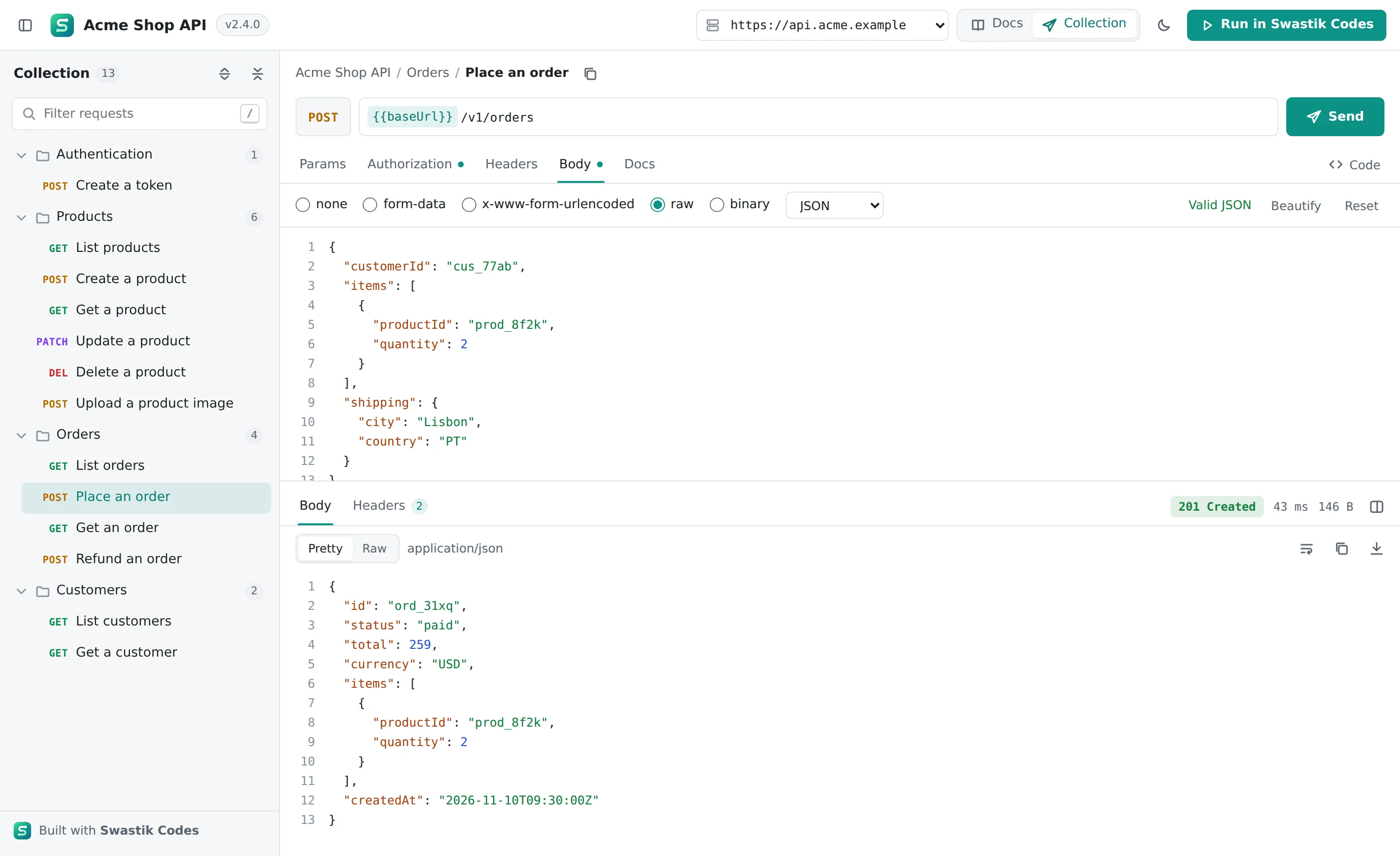
/swc/collection | A collection of every request, grouped in folders. Edit params, authorization, headers and the body (JSON, form fields and file uploads), press Send and read the response: pretty JSON, headers, status, time and size. |
/swc/openapi.json | The OpenAPI document both pages read, with your edits applied. Readers can download it. |
Both pages have a Run in Swastik Codes button that opens the API in Swastik Codes as a collection, where readers can save requests, write tests, run them in the collection runner and share them with a team.
Edit the pages with one JSON file
Run python -m swastik_codes init or npx @swastik-codes/docs init to write a starter swastik-codes.json. Every field is optional; your OpenAPI document provides everything else. Edit the file and reload the page: there is no restart and no build step.
{
  "title": "Acme Shop API",
  "description": "Products and orders for the Acme store.\n\n## Getting started\n\n1. Get a token.\n2. Send it as a bearer token.",
  "servers": [
    { "url": "https://sandbox.acme.example", "description": "Sandbox" },
    { "url": "https://api.acme.example", "description": "Production" }
  ],
  "theme": { "accent": "#0d9488", "mode": "system" },
  "groups": [
    { "name": "Start here", "tags": ["Authentication"] },
    { "name": "Store", "tags": ["Products", "Orders"] }
  ],
  "operations": {
    "POST /orders": { "summary": "Place an order", "description": "Reserves the stock for 15 minutes." }
  },
  "hide": ["/internal/*", "DELETE /admin/*"],
  "pages": [{ "title": "Errors", "body": "Every error is `{\"detail\": \"...\"}`." }],
  "links": [{ "label": "Status page", "url": "https://status.acme.example" }],
  "languages": ["curl", "javascript", "python", "go"]
}- Title, version and introduction: Markdown, tables included.
- Servers: the base URLs readers can pick from. Readers can also type their own.
- Theme: an accent colour, and whether the pages open light, dark or follow the reader's system.
- Folders and sections: rename tags, describe them, and put them in sections such as Start here.
- Requests: a better name or description for any request, by
"METHOD /path"oroperationId, or hide it. - Hide: leave out internal paths with patterns like
/internal/*. Hidden requests are removed fromopenapi.jsontoo. - Pages and links: extra Markdown pages under the introduction, and links to your status page or support.
The npm package ships a JSON Schema for the file, so editors like VS Code complete and check every field.
The Swastik Codes logo, the Built with Swastik Codes credit and the Run in Swastik Codes button are part of both pages. They have no setting, and a key such as logo in the file is ignored with a warning.
Small, fast and cheap to run
We measured the pages against the two common alternatives on 5 November 2026:
| Downloaded by the browser (compressed) | Unpacked | |
|---|---|---|
| Swastik Codes docs | 22 KB | 74 KB |
| Swagger UI 5.17 | about 427 KB | about 1.6 MB |
| ReDoc 2.1 | about 232 KB | about 908 KB |
- One script and one stylesheet, compressed in advance (brotli and gzip) and cached by browsers for a year. The pages themselves are under 1 KB of HTML.
- Little work on your server. The merged OpenAPI document is built once and cached until your spec or
swastik-codes.jsonchanges. A repeat request costs microseconds, and browsers that already have it get304 Not Modified. - Large APIs stay fast. In our test with 2,000 requests the documentation showed its first content in under half a second and used about 5 MB of JavaScript memory, because each section is drawn only when it scrolls near the screen. The collection page lists all 2,000 at once.
- No outside requests. Every file comes from your server, so the pages work offline, on an intranet and behind a VPN.
Security
- The pages are sent with a strict Content-Security-Policy: no inline scripts, and scripts and styles from your server only.
- Tokens a reader types into the collection stay in that browser tab (session storage) and are only sent with the reader's own requests.
- Text from your OpenAPI document and Markdown is escaped before it is shown, so a description can't add scripts to the page.
- Only swastik.codes and the Swastik Codes desktop app are allowed to read
openapi.jsonfrom another origin, for the Run in Swastik Codes button.
Things to know
- Requests come from the reader's browser. Requests to the server that serves the pages always work. To send requests to a different server (for example production, from docs hosted on staging), that server must allow CORS for the docs' address. Swagger UI has the same limit.
- APIs on localhost. swastik.codes can't reach a server on your computer, so on
localhostthe Run in Swastik Codes button offersopenapi.jsonas a download to import instead. The desktop app andswc bridgecan calllocalhostdirectly. - Your framework needs an OpenAPI document. FastAPI and Fastify (with
@fastify/swagger) make one for you. For Express, Flask and Django, use the generator you already have, such asswagger-jsdoc,@nestjs/swagger, apispec, flask-smorest or drf-spectacular. - Hosted docs instead. If you would rather not serve docs from your app, publish documentation from a Swastik Codes collection.
Frequently asked questions
Does it replace FastAPI's Swagger UI?
It can sit next to it or replace it. mount(app) adds /swc/docs and /swc/collection and leaves /docs and /redoc alone. To use only these pages, create the app with FastAPI(docs_url=None, redoc_url=None). To serve them at /docs, also pass prefix="" to mount().
Is it free?
Yes. Both packages are free to install and use, in development and in production. They are proprietary software from Shwastik Tech Solutions Pvt Ltd, not open source.
Which OpenAPI versions work?
OpenAPI 3.0 and 3.1, and Swagger 2.0. $refs, allOf, oneOf and anyOf, nested and self-referencing schemas, examples, enums, defaults and file uploads are all handled.
Can I remove the Swastik Codes logo or the Run in Swastik Codes button?
No. They are part of the pages, and the licence does not allow removing, hiding or changing them. Everything about your API itself (name, text, servers, colours, folders and which requests show) is yours to edit.
Does anything get sent to Swastik Codes?
No. The pages load nothing from swastik.codes and include no analytics. A reader's browser contacts swastik.codes only when they click Run in Swastik Codes.